Oct 4, 2025
Design the prompt, not just the words: turning flows into prompts
Turn complex software ideas into simple, engaging stories using visuals that connect with users and drive understanding.

As AI and prototyping tools continue to advance rapidly, understanding how to craft effective prompts is becoming increasingly important. After completing online prompt engineering courses, I focused on using prompts efficiently, especially with the upcoming limited credits. To deepen my grasp, I asked four AI tools — Originality AI, Generate Prompt AI, Claude, and ChatGPT- how they prefer to be prompted.
Prompt engineering involves more than words; it’s about structuring and limiting the task. As a UX designer, user or process flows are our best asset, aligning product requirements with teams and minimizing ambiguity. Combining clear prompts with these flows helps AI yield precise specs, improved copy, and reliable prototypes.
What is User Flow?
Figma defines a user flow as a visual roadmap of a user’s journey, outlining the steps they take to complete a specific task within a product or service. It’s like following breadcrumbs through your product, showing every twist and turn from “I need this” to “Awesome, I did it!”
Consider it a product strategy blueprint. User flows help teams visualize how users interact with features and identify potential barriers before design or development begins. See my earlier article on User Flows
Prompt: “How best can I ask AI to generate a prompt to complete a task? What elements should I consider, and how would AI like to be asked?”
Summary of Feedback from the tools
Originality AI: Emphasizes a project-plan style prompt that forces clarity up front: define the objective, audience, context, constraints, and step-by-step actions; specify tools/resources and any sequencing needed; state expected outcomes/deliverables and the feedback or evaluation mechanism. The guidance encourages you to be concise, unambiguous, and measurable, allowing for execution to be assessed against success criteria.
Generate Prompt AI: Recommends enriching the request with context (task, desired format, constraints, and goals), aligning it with how models parse information, and adding clear sections, explicit evaluation criteria, and examples. It highlights, including assumptions, edge cases, and how results will be judged, and asks for a structured, ready-to-use response rather than commentary.
Claude.com: Shows a fully worked example that pairs a “system” brief with a detailed “user” spec. It models strong scaffolding: role + task, then concrete requirements (navigation, sections, states, assets, and behaviour), acceptance constraints (responsiveness, accessibility, maintainability), and explicit deliverables (HTML/CSS/JS). The takeaway is to front-load the brief with specific components, behaviours, and quality bars.
ChatGPT offers a compact playbook: start with a goal-first and context-rich approach; constrain length, audience, and style; require a specific output format; include positive/negative mini-examples (“golden signals”); and add a checklist/acceptance criteria. It also supplies a reusable “build a best-practice prompt for {task}” meta-prompt and a designer-oriented checklist.

Google image showing a small robot pressing a glowing “AI SEARCH” button as a person types on a laptop.
I experimented with some tool-generated prompts and found them useful; however, I noted a limitation: without a shared structure or context, the outputs were generic. Supplying user flows as part of the prompt significantly improved quality.
Why Flows Help AI
Clarity of scope: The flow enumerates states, branches, and exits so the model won’t “forget” steps.
Better sequencing: Flows encode order; the model mirrors it in copy, specs, or code.
Edge-case coverage: Decision diamonds → explicit conditions → fewer blind spots.
Role & system boundaries: Swimlanes make ownership obvious (user vs. system vs. 3rd party).
Traceability: You can target paths precisely (e.g., “opt-in only: N3→N5→N7”).
Tip: Don’t just paste a screenshot. Include a one-paragraph summary of the flow, name the nodes/IDs, and specify the target path(s) you want the model to work on.
Below is an updated Prompt Template
Use this template to craft your prompt or guide AI to create one, focusing on these key elements are helpful. Using flows can help answer most of the questions below, and with a summary text, AI can generate useful prompts that cover the areas below:
Role: Include a persona for context (recommended or prompt will default to the neighbouring persona).
Task (one sentence)
Goal/success criteria (how you’ll judge it)
Audience & tone, if any
Inputs & constraints (length, sources, limits)
Context/background (what’s unique here)
Required structure (sections, tables, or JSON keys)
Examples & counterexamples, if any
Edge cases / Anti-goals: State what to avoid (e.g., prevent truncation; use text wrap as needed).
Interaction states: List required states (empty, loading) and specify correct calls to action.
Typography*: Include font types, sizes, spacing, radius, colours, and contrast ratio as needed.
Accessibility Consideration*: This may include, but not be limited to, Alt text where required, Screen reader accessible, keyboard accessible, visible focus states, Form controls with associated and descriptive aria labels, and colour contrast accessible Web Content Accessibility Guidelines (WCAG) AA Acceptable. Announce state changes (toasts, validation) via ARIA live regions.
Acceptance criteria: Specify whether desktop/mobile, the number of screens, or the number of flows is required. What is an acceptable output in your context?
Follow-up (optional): Ask for missing info or make best-effort assumptions if needed.
To demonstrate how user flows can enhance prompts in practice, I created a mix of task and user flows and numbered nodes so that AI could target specific paths. This method can be easily adapted to various AI models.
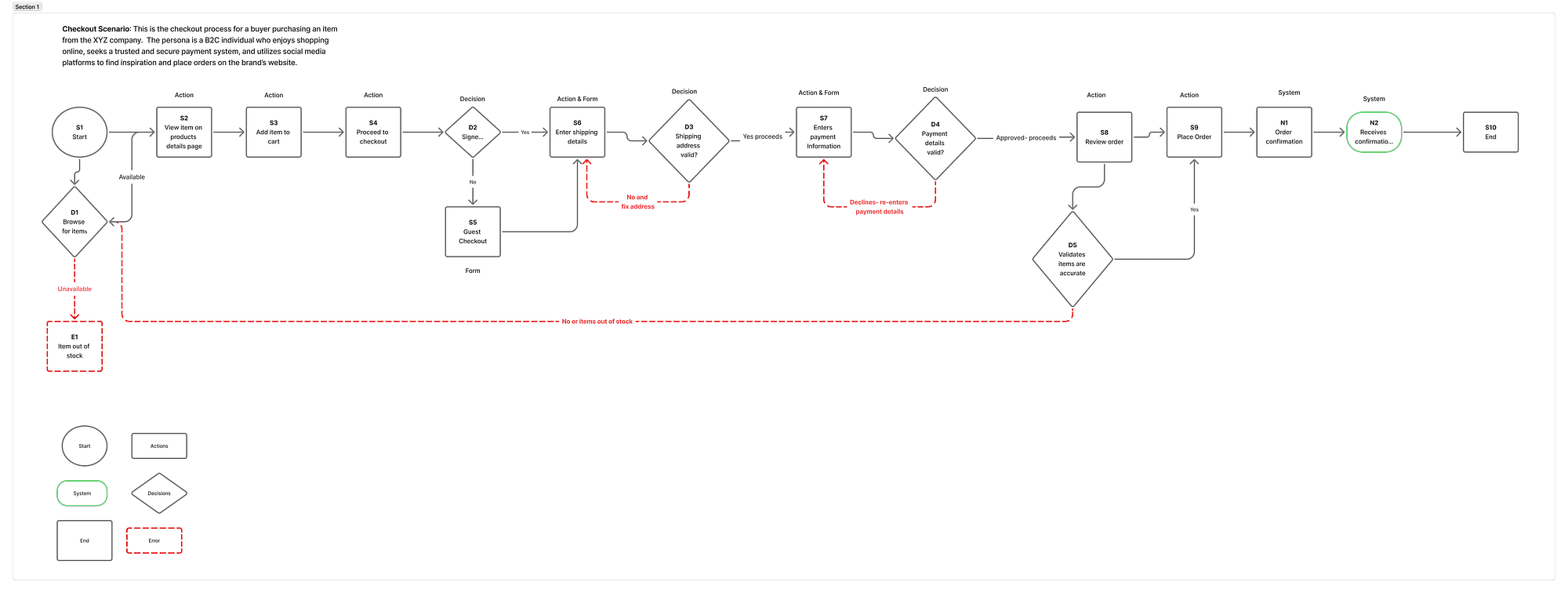
Business-to-consumer online Checkout Experience user flow
The checkout flow begins with the customer browsing the product catalogue and adding their desired items to the shopping cart. Next, the customer reviews the cart to ensure the items and quantities are correct. Afterward, the flow leads the customer to enter their shipping details and select a delivery option. The customer then proceeds to the payment stage, where they provide payment information and confirm their order. Lastly, a confirmation screen is displayed, summarizing the purchase details and outlining the next steps. This structured path allows the AI to generate prompts that align with each step of the checkout process, ensuring accuracy and coherence.
I asked ChatGPT-5 (thinking model) to generate a prompt based on the flow above and provided it with the typography and a summary to use.
Prompt: “Generate a prompt for the attached checkout flow. Below is the typography to consider Typography scale: 12/14/16/18/20/24/32; body = 16px; line-height ≥ 1.5. Spacing: 4/8/12/16/20/24. Use multiples of 4 only. Radius: 8/12/16. Shadows: subtle elevation only on overlays. Colours: primary blue (buttons/links), neutrals for cards, success/warn/error; contrast ≥ 4.5:1 for text.”
And the second prompt: generate a prompt for checkout flow
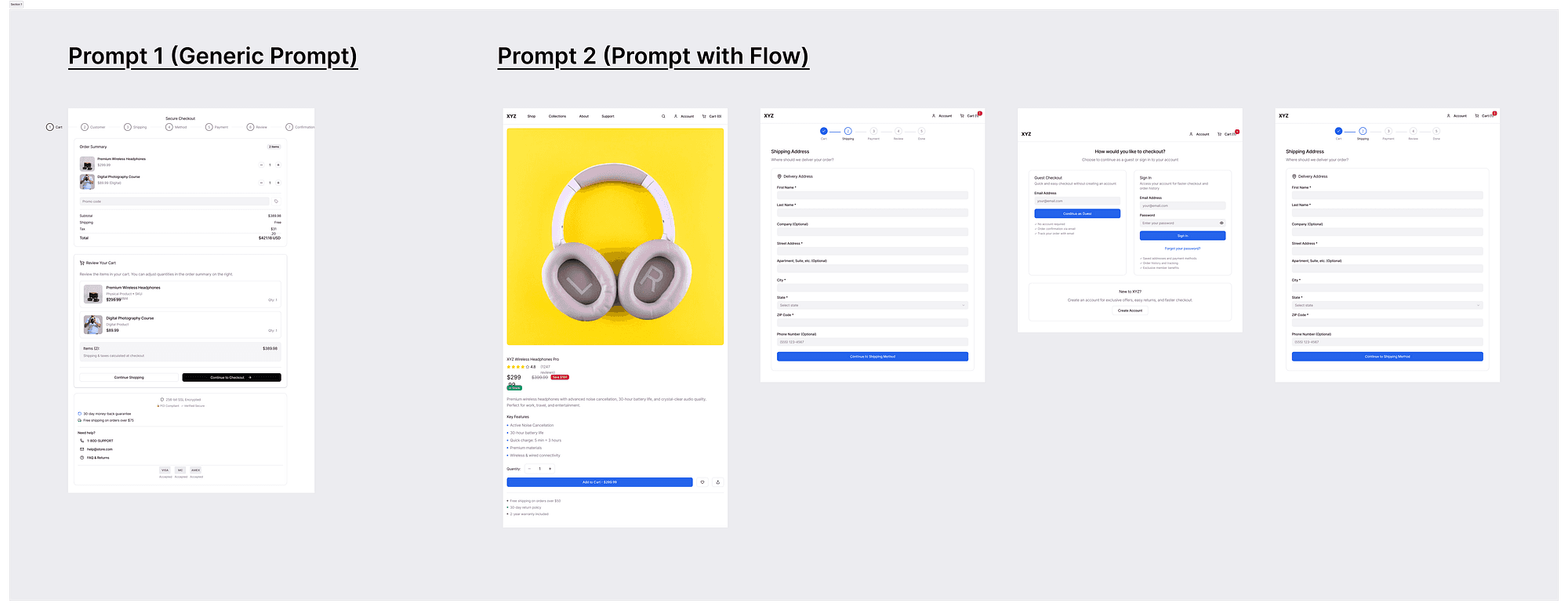
Side-by-side comparison: generic checkout screen vs multi-step checkout screens created with a flow.
Prompt 1 Prototype Prompt 2 Prototype
The Difference between a generic prompt and a flow prompt result
To show the difference between a flow-aware and a flow-agnostic prompt, I limited the prompt count for simplicity. Prompt 2 still requires further steps, but the below highlights the differences between them. I reviewed the code and asked ChatGPT to outline key elements from both.
The generic prompt yields a thin wrapper that hides most behaviour inside a provider-driven <CheckoutFlow/>, exposing no clear step enum, guards, or data contracts, so navigation legality is implicit, UX defaults to a “generic checkout,” tokens/A11y aren’t guaranteed, and maintainability risks shift to hidden internal complexity.
In contrast, the flow-aware prompt produces an explicit, step-by-step architecture (Cart → Auth → Shipping → Method → Payment → Review → Confirmation) with concrete, testable state (cart, user, shipping, payment, pricing), real navigation and partial gating, and visible handlers for transitions and toasts.
It also incorporates UX structure (progress indicator, review/edit paths, confirmation, and micro-copy hooks), aligns with design tokens and accessibility readiness, and, while it requires a bit more refinement, it’s far easier to reason about, verify, and iterate by step.
Recommendation: Use the flow-aware build (Prompt 2) as your base, as it encodes the full checkout journey with the correct screens, states, and recovery paths. Then lift its state/handlers into a Provider that uses an explicit step and guarded transitions.
Furthermore, you can also prompt the model to audit consistency, accessibility, mobile responsiveness, and flow. Here is a sample ready-to-use prompt. You will still need to make some adjustments or provide specific prompts, but a high-level review doesn’t hurt.
Prompt: “Generate a prompt to check consistency, accessibility, and flow, ensuring every page loads with a clear, helpful initial state (loading → welcome/zero-data) that seamlessly transitions to the populated state once the user adds content. User data is durable (persisting across sessions/devices) and never overwritten by defaults or interactions across the platform during final review.”
System consistency prompt generated by ChatGPT
What I learned
The key insight: Structure beats verbosity. Strong user flows, when combined with clear, concise constraints, consistently lead to better, more reliable AI outputs than those that rely solely on detailed wording. Flows guide AI to follow expert-aligned paths instead of improvising.
Name your nodes. Referencing paths by ID lets you scope and test precisely.
Bake in acceptance criteria. If you can’t measure “done,” the model can’t aim for it.
Reuse templates. A small library of prompt and review templates speeds up design loops.
Reduces hallucination: concrete flows help AI reduce hallucinations by choosing a nearby or incorrect template when creating a design.
Speeds iteration & handoff: Designers and engineers can test the “happy path” and error paths immediately, reducing the need for prompts to fill gaps.
Improves consistency with tokens: Spacing, type scale, radii, and colour roles are applied predictably across all steps, not just a single screen.
As UX designers, these tools, in their current phase and capabilities, are great for ideation and quick prototyping for discussion purposes. Most templates are the nearest neighbours; hence, most people would receive similar templates. These tools do not diminish our creativity; our goal remains the same while taking brand guidelines and design systems into account.
Next Steps
Create a prompt library as your team’s resource; this encourages reuse and efficiency.
Identify your use case and define your prompt template.
Explore various tools to determine which is most suitable for your team.
Be prepared to apply all design principles to identify errors and flaws and iterate on designs through either prompts or manual updates.
Now more than ever, accessibility is crucial to ensure that final deliverables are accessible and inclusive.
To integrate flows into your current design process or tools, teams can begin by incorporating the task of identifying key user flow steps during initial project planning meetings. Ensure team members are familiar with the prompt template and encourage them to use it as a standard checklist when setting up AI-related tasks. Additionally, designate someone to review prompts to maintain consistent quality and adherence to the user flow strategy.
I look forward to sharing more techniques as I learn about other models, agents and automating handoffs.
References
Figma Make and Figjam (For design iterations)
Blog reposted from Medium- Veronica Dogbegah (Visiting consultant and lecturer)